> ## Documentation Index
> Fetch the complete documentation index at: https://docs.auxia.io/llms.txt
> Use this file to discover all available pages before exploring further.
# Enable Auxia to Send Push Notifications
> Configure Auxia to send push notifications through Firebase
1. Service Account Setup
Auxia uses a GCP service account to authenticate push notification API calls.
**Follow these steps:**
1. **Get started using Firebase** with an existing Google Cloud project.
2. **Create a service account** in the linked GCP project.
3. **Assign the following role to the service account:**
**Firebase Cloud Messaging API Admin**
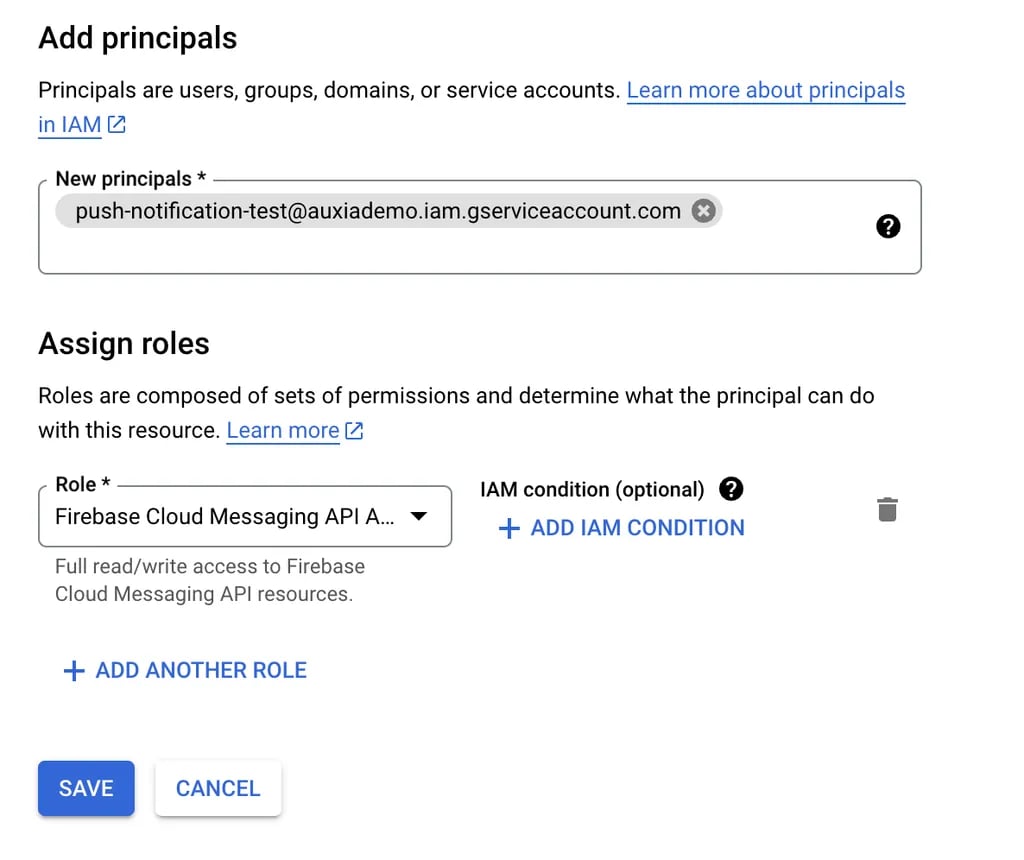 4. **Generate a JSON Key** for this service account.
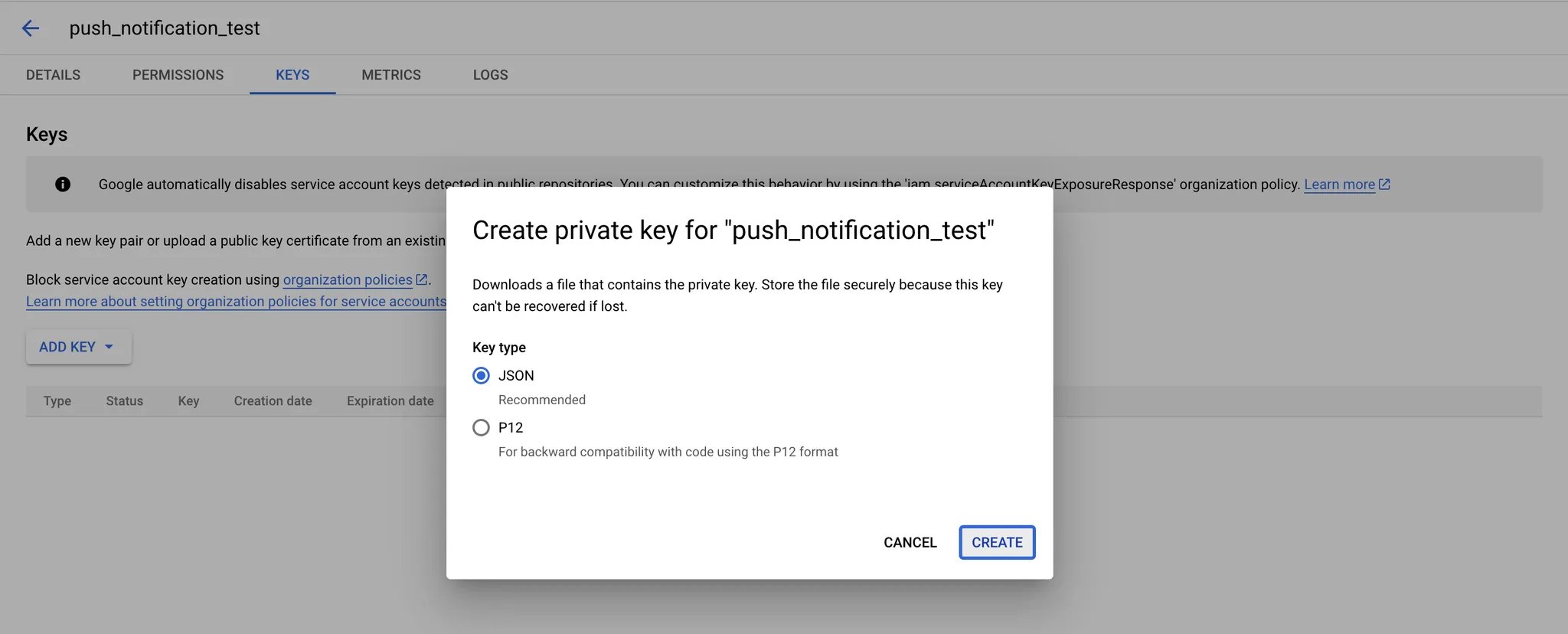 Share this service account JSON key with the Auxia team.
## 2. FCM Token
The **FCM token** is a unique identifier for a device registered with Firebase Cloud Messaging (FCM). This token is required to send push notifications to a device.
**Lifecycle:**
* Use `getToken()` to generate the token.
* Monitor for token refresh events.
> Ensure your application updates the user\_id to FCM token mapping on your backend. This ensures push notifications are delivered to the correct users.
For a sample implementation, see the [Sample Flutter Set up](/deploying-auxia/delivery-integrations/firebase-push-notifications-integration-manual/sample-flutter-set-up) section.
The user\_id to FCM token mapping should be shared with the Auxia team through User Attributes ingestion. Use the property `fcm_token` with the `string_value` field set for the property value.
## 3. Delivery Details
**Pre-requisites:**
* FCM token is used to identify a particular user.
* Service account JSON Key is used for authentication.
* On the server, the JSON key is used to retrieve a short-lived OAuth 2.0 access token.
* The access token is used in the send-message API with the FCM token as the user identifier.
Auxia uses **data-only messages** (no `notification` object). All fields — including `title`, `body`, and `image` — are sent as key-value pairs in the `data` object. This ensures compatibility across both Android and iOS.
**Example payload:**
```json theme={null}
{
"message": {
"token": "bk3RNwTe3H0:CI2k_HHwgIpoDKCIZvvDMExUdFQ3P1...",
"data": {
"title": "Portugal vs. Denmark",
"body": "great match!",
"Nick": "Mario",
"Room": "PortugalVSDenmark"
}
}
}
```
Share this service account JSON key with the Auxia team.
## 2. FCM Token
The **FCM token** is a unique identifier for a device registered with Firebase Cloud Messaging (FCM). This token is required to send push notifications to a device.
**Lifecycle:**
* Use `getToken()` to generate the token.
* Monitor for token refresh events.
> Ensure your application updates the user\_id to FCM token mapping on your backend. This ensures push notifications are delivered to the correct users.
For a sample implementation, see the [Sample Flutter Set up](/deploying-auxia/delivery-integrations/firebase-push-notifications-integration-manual/sample-flutter-set-up) section.
The user\_id to FCM token mapping should be shared with the Auxia team through User Attributes ingestion. Use the property `fcm_token` with the `string_value` field set for the property value.
## 3. Delivery Details
**Pre-requisites:**
* FCM token is used to identify a particular user.
* Service account JSON Key is used for authentication.
* On the server, the JSON key is used to retrieve a short-lived OAuth 2.0 access token.
* The access token is used in the send-message API with the FCM token as the user identifier.
Auxia uses **data-only messages** (no `notification` object). All fields — including `title`, `body`, and `image` — are sent as key-value pairs in the `data` object. This ensures compatibility across both Android and iOS.
**Example payload:**
```json theme={null}
{
"message": {
"token": "bk3RNwTe3H0:CI2k_HHwgIpoDKCIZvvDMExUdFQ3P1...",
"data": {
"title": "Portugal vs. Denmark",
"body": "great match!",
"Nick": "Mario",
"Room": "PortugalVSDenmark"
}
}
}
```