> ## Documentation Index
> Fetch the complete documentation index at: https://docs.auxia.io/llms.txt
> Use this file to discover all available pages before exploring further.

# 最初のAPI呼び出し

> Auxiaで最初のAPI呼び出しを行う方法

<Note>
  日本語版はAIによる翻訳です。正確な情報については[英語版](/deploying-auxia/deploying-with-auxia-api/making-your-first-call)をご参照ください。
</Note>

## ステップ1: サンプルトリートメントを作成する

こちらのガイド[(最初のトリートメントの作成)](/ja/getting-started/step-4-creating-your-first-treatment)にアクセスして、テスト用のサンプルトリートメントを設定してください。

## ステップ2: リクエストを送信する

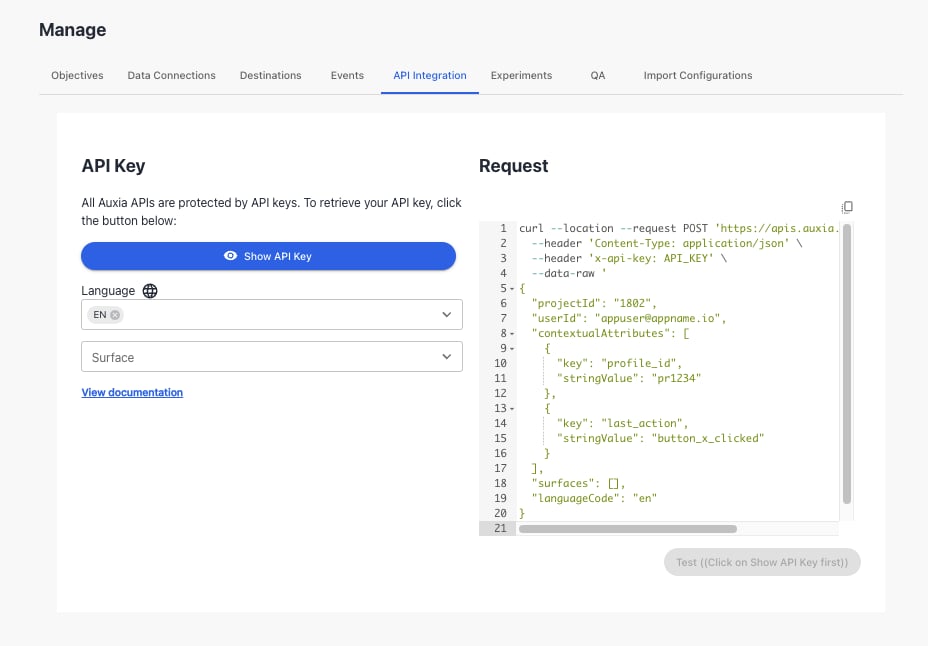
コンソールに移動し、**API Integration** タブをクリックして、「Show API Key」をクリックしてAPIキーを取得します。

<img src="https://mintcdn.com/auxia/XsfpA_ObWj7oESRX/img/deploying-auxia/api-integration.png?fit=max&auto=format&n=XsfpA_ObWj7oESRX&q=85&s=fc3139ad0ab6e29e602b819da02e7f76" alt="api-integration" width="928" height="646" data-path="img/deploying-auxia/api-integration.png" />

APIキーを取得したら、以下のcurlリクエストをUIまたはターミナルから実行してください。

```
curl --location --request POST 'https://apis.auxia.io/v1/GetTreatments' \
--header 'Content-Type: application/json' \
--header 'x-api-key: *********************' \
--data-raw '{
    "projectId": "1802",
    "userId": "gGTE8CWUIgpzPivCejVk7JN284V",
    "surfaces": [
        {
            "surface": "HOME_PAGE",
            "maximumTreatmentCount": 1
        }
    ]
}'
```

**リクエストの内容**

```
{
    "projectId": "1802",
    "userId": "gGTE8CWUIgpzPivCejVk7JN284V",
    "surfaces": [
        {
            "surface": "HOME_PAGE",
            "maximumTreatmentCount": 1
        }
    ]
}
```

このリクエストには以下のパラメータがあります:

<table>
  <thead>
    <tr>
      <th>Param</th>
      <th>Type</th>
      <th>Description</th>
    </tr>
  </thead>

  <tbody>
    <tr>
      <td>projectId</td>
      <td>string</td>
      <td>特定のお客様のプロジェクトに対して、常に同じ値を使用します。</td>
    </tr>

    <tr>
      <td>userId</td>
      <td>string</td>
      <td>各ユーザーの一意のIDです。</td>
    </tr>

    <tr>
      <td>surfaces</td>
      <td>string</td>
      <td>surface JSONを参照してください。</td>
    </tr>
  </tbody>
</table>

**Surface**

<table>
  <thead>
    <tr>
      <th>Param</th>
      <th>Type</th>
      <th>Description</th>
    </tr>
  </thead>

  <tbody>
    <tr>
      <td>surface</td>
      <td>string</td>
      <td>特定のUIコンポーネント、画面（ホーム画面）、またはユースケース（クーポン）に対してトリートメントをリクエストするためのクライアント設定パラメータです。surfaceの典型的な例としては「HOME\_SCREEN」や「PURCHASE\_SCREEN」があります。</td>
    </tr>

    <tr>
      <td>maximumTreatmentCount</td>
      <td>int64</td>
      <td>指定されたsurfaceに対してクライアントに返されるトリートメントの最大数です。値が設定されていない場合、デフォルトは1です。</td>
    </tr>

    <tr>
      <td>minimumTreatmentCount</td>
      <td>int64</td>
      <td>指定されたsurfaceに対してクライアントに返されるトリートメントの最小数です。このフィールドが設定されている場合、レスポンスには0個、またはminimumTreatmentCount以上のトリートメントが含まれることが保証されます。値が設定されていない場合、デフォルトは0です。</td>
    </tr>
  </tbody>
</table>

以下はサンプルレスポンスです:

```
{
   "responseId": "690e24d8-16a6-4518-bf37-09a8f0120dfb",
   "userTreatments": [
       {
           "treatmentId": "6",
           "treatmentTrackingId": "6_690e24d8-16a6-4518-bf37-09a8f0120dfb",
           "rank": "1",
           "treatmentContent": "{ title: 'You have a new message!', description: 'Learn how our product helps you', cta_name: 'Learn more', cta_link: '/tabs/home/feed'}",
           "treatmentType": "IN_APP_CONTENT_CARD",
           "surface": "HOME_PAGE",
           "contentLanguageCode": "en",
       },
       {
           "treatmentId": "4",
           "treatmentTrackingId": "4_690e24d8-16a6-4518-bf37-09a8f0120dfb",
           "rank": "2",
           "treatmentContent": "{ title: 'Check out your trends', description: '87% of users found this feature useful', cta_name: 'View trends', cta_link: '/actionscreen'}",
           "treatmentType": "IN_APP_CONTENT_CARD",
           "surface": "HOME_PAGE",
           "contentLanguageCode": "en",
       }
   ]
}
```
